
Pattaya Days Gone
An ordinary backup from an extraordinary website
I first became aware of the possibilities of pirated software when I was living in The Hague in the 1980s. It was the time of the Atari 800 and games at a shop were hard to find and very expensive. But, as an alternative, there was “the list”.
The list contained a large selection of software titles, and a telephone number. Call the number and a shady character would arrive at your door under cover of darkness; a little like a drug dealer. In fact he probably had a second job as a drug dealer; but we knew him as the man who provided cheap software for cash.
Once we moved to Kuala Lumpur; things became a little easier. The local malls were stuffed with illegal software, so much so that it was well-nigh impossible to purchase anything original. By this time The Son had moved away from gaming and needed graphics development software that cost five thousand pounds in the UK. Considerably less money in KL bought you everything you needed on nine disks. The Son was soon developing clever plug-ins for this software, such that the company concerned called him and asked him if he would like a job as European Development Consultant. Fortunately they didn’t also ask where he bought his software from. So the son dropped the idea of university and instead headed off for a career as a software engineer; hopefully he has used legal software ever since.
Over the years I have gradually reduced my consumption of pirated software; and eventually the only illegal program on my Mac was Photoshop. Instead of paying a huge amount of cash for an original, I pay a couple of hundred baht for CS5 at Tuk Com. This had to be supported by software tools which stopped the program contacting Adobe and asking if it was legal; and of course I never received any updates.
Then along came Photoshop CC (Creative Cloud) and the concept of a subscription model. For 300 baht a month you get the rights to use Photoshop CC and Lightroom; which is a whole lot easier to swallow than a full purchase. After months of pondering, I finally took the plunge and I now have a fully legal Photoshop on my computer (I had already purchased Lightroom). Adobe seem keen to let me know how lucky I am by providing an update almost every day. Haven’t had much time to play with it yet, but the Field Blur tool is pretty cool.
From this:

Or in my case, the thirteenth.
Yep, it’s been thirteen days of crucifixion-level suffering as I rather foolishly undertook a solo attempt to re-decorate the main living area of our condo. I would like to report that I am finished; but the more I fettle, the more I find that needs to be fettled. It may never be finished. But she who must be obeyed has returned from up north so I am now required to spend at least part of my day not elbow deep in dust and paint spray.
Those who notice these things may have spotted that I have been somewhat quiet over the past few days. This is because my wife has left me.
She needed to go home to Ubon to sort out some things for her mother’s house, and so decided to make an extended trip of nearly two weeks and stay for Songkran.
Of course the question came up, would I like to go too? Well, of course I would, I lied quickly, but we have a sick cat that needs tending and I really have to get on with painting the condo having purchased the paint months ago and looked at it only occasionally since then. The cat and the paint thing contain some elements of truth, but the reality is that I could not stand an extended period with her grandmother. It appears I am not alone in this, because my wife was on the phone on the first day explaining the many methods she would like to employ to silence the old bat permanently. I have sent a machete by EMS.

Been quiet for the last few days, partly because I have undergone a major project to clear out a store room (astonishing how much crap I have accumulated), and also because I have been accompanying she who must be obeyed on a three day juice fast.
She has decided that she wants to eat better, and she wants to lose weight, and to kick things off she wanted to spend three days drinking nothing but veggie/fruit juice. The inspiration for this was Joe Cross’s documentary Fat, Sick and Nearly Dead; and if you have a weight problem and want to do something about it, it’s worth a watch. The idea is to reboot your digestive system and give it a rest for a few days by consuming nothing but juice. A minimum of three days is recommended (although you can go for thirty days or more if you really need to shed a load of weight). Watching Joe’s film, it was clear that the first few days are the worst as you system adjusts to a fluid diet; so I was assuming it would not be fun.
And it wasn’t. The juices we put together were tasty enough, but I suffered from headaches, listlessness, and generally felt like crap. She who must be obeyed suffered similarly, and it was good to head back to solid food today. We both lost close to 3kg in three days; it is now up to my wife to decide whether she wants to continue her weight loss by eating sensibly, or whether the constant need for Thai snacks will win.
As for me, I was happy to return to my normal consumption of fruit and vegetables in solid form.
It’s a few days away from the one year anniversary of my juicer purchase. I drink fewer juices than when I bought the machine, with the juice ingredients now being consumed as salads instead; which is of course more filling and just as beneficial nutritionally. Thanks to my improved diet (which also excludes meat), I weigh ten kilos less than I did a year ago (expect that to revert to 8 kilos once the juice fast effect has worn off), my waist size has decreased from a tight 34" to loose 32"; and most important of all I feel healthier. I was regularly afflicted with man flu, and variations thereof. Since I started juicing and eating well, I have not had a single day’s sickness.
More support for a primarily plant-based diet came from the results of study published last week that suggested that the recommended five portions a day of fruit and vegetables is insufficient, and to gain maximum benefit we should be consuming seven portions. “Eating at least seven portions of fresh fruit and vegetables a day was linked to a 42% lower risk of death from all causes”. Presumably this excludes being hit by a bus.
Cue much moaning in the comments section of news sites, arguing that eating such a large quantity is unrealistic. Seven portions represents 560 grams of produce; how could anyone eat that in a day?
This is my typical daily salad meal (that’s a large plate on a large stool):


Thai news in English is so refreshingly straightforward. Take this headline from the Chiang Mai City News:
Man Murdered After Raping His Friend’s Cow
That’s telling it straight. English broadsheets would have treated it differently.
Cownal knowledge - The Sun (and Pattaya Days)
Bovine bonking prompts hoe hacking - The Mirror
Romanian immigrants and benefit scroungers suspected in murder tragedy - Daily Mail
Whatever, it’s a sad but amusing tale. Two friends go drinking (a lot). One goes to sleep and then wakes up to find his friend raping his cow. Presumably intimate relations with his cow are subject to permission; because the just-woken man kills his friend with a hoe.
The Phantom 2 Vision is a fine machine. but the documentation can be sparse in places, and hard to track down. Consequently there is a feature of the machine which you may never have heard about, but which gives you so many more flying options; or you may have heard about it but can either not find out how to enable it, or are keeping away because DJI tells you it is for advanced fliers only. Nonsense; it’s called the NAZA mode and your flights will be more pleasurable and safer if you have it enabled.
First I will tell you what it does; then if you like the sound of what it can do, I will tell you how to enable it.
By default your Phantom is set in Vision 2 mode. In this mode, the two shiny switches on top of the transmitter serve no purpose (apart from the right hand one which you frantically toggle as if attempting to bring it to orgasm in order to initiate the compass calibration mode). So when you fly, it doesn’t matter what position the switches are in.
In NAZA mode, these 3 position switches offer a number of functions; with “normal” flight being achieved with both switched in the up position. And this is why DJI says that this mode is not for beginners; because apparently beginners are not capable of checking that the switches are up before flying. Assuming you have the intellect to ensure that the switches are in the upright position before flying, then NAZA mode may be for you.
So, switches up and start to fly, and the Phantom will fly exactly the same in NAZA mode as it did in Vision 2 mode.
Now let’s play with the switches, starting with right hand side (S1). In the default top position you are flying in GPS mode, meaning that the Phantom will attempt to maintain the same position in space when you take your hands off the stick. Move the switch to the middle position and you are now flying in Attitude mode, or Atti for short (or A if you are really trying to abbreviate to the maximum [or max, or M]). In this mode, your Phantom will attempt to maintain height and direction by means of the barometer and compass; but GPS is switched off; so your craft will drift with the wind (if there is no wind at all, you probably won’t notice any difference).
Why would you want to use this? Maybe you have been flying upwind. For an easy return, flip it into Attitude mode and let it drift back to you. Wind direction permitting, it can also be useful for smooth video. Fly upwind, start your video, and then turn on Attitude mode and let the video run as your Phantom is born along on the wind.
The bottom position of S1 initiates the Return To Home (RTH) procedure; whereby your Phantom climbs to 20 metres if it is lower than that, flies back to the starting point and then gently lands at your feet to the applause of admiring onlookers. Normally, RTH switches on when you have lost contact with your Phantom; but there are times when you may want to initiate it even though you have a connection. The first is to impress those onlookers (I have been guilty of that); and the second maybe when you have had enough flying and just want to let your Phantom come home on its own. The problem is that in Vision 2 mode, the only way you can trigger RTH is to turn off the transmitter. This is all well and good if your Phantom does then return to home and land; but if it decides to bugger off instead, there is nothing you can do to reconnect; and you will left looking like a fool in front of an expectant crowd.
In NAZA mode, the bottom position of S1 will initiate RTH, but you can regain control by flicking up the switch at any time. Much better.
On the left we can find S2, home of the Intelligent Orientation Control (IOC) functions. In the up position (or in Vision 2 mode), IOC is off. And there you are, your Phantom a zillion metres high and a zillion metres away; and you want to bring it home. To do that, you need to know where the front of the craft is pointed so you can bring it back towards you. Unfortunately, given the shape of the thing, it can be impossible to know which is the front just by looking at it, especially from a zillion metres away. So you have to squint at the display on the phone to work out orientation (assuming you haven’t lost WiFi contact) and then mentally calculate which stick to throw to bring it back; by which time the batteries have died and it has landed in a swamp.
Hello S2! Flick the switch to the bottom position and you are now in Home Lock mode. Then pull back on the right hand stick and the Phantom will return to its starting point, irrespective of the direction in which it is pointed. I find this massively useful. Whenever I have finished with a flight, I turn on Home Lock and just bring it home; so easy.
The middle position is less obviously useful. It’s called Course Lock and when it is enabled, the Phantom will respond to the sticks as if it is aligned in the direction it was facing at time of take off. So if your Phantom was facing East when you took off and is now pointing North, pushing the right stick forward will send it north. Flick onto Course Lock and pushing the stick will send it East. No, I can’t think of a use for it either.
Still, access to Attitude, RTH and Home Lock modes is worth having, so how do you switch to NAZA mode?
Connect your Phantom to your computer and turn it on. Start up the Assistant software and on the top right hand side you will see a button set to Vision 2 mode. Click on it to change to NAZA mode.
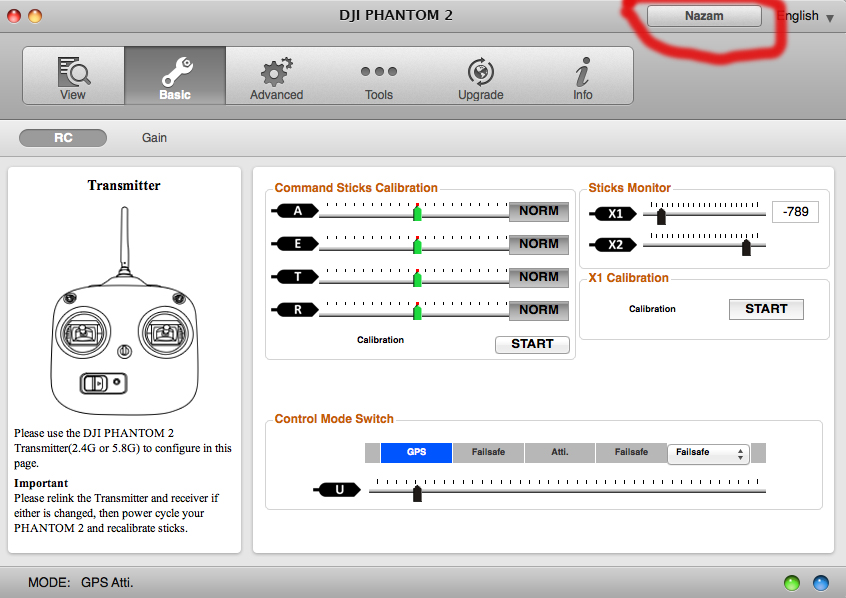
Next, select basic mode and as you flick S1 you will see the options change in the control mode switch. In the down position you will see you have selectable choices.

Make sure you have selected Failsafe; which triggers the Return To Home mode. Another option is Manual, which removes all the limits of the flight system and allows advanced pilots to perform rolls and other aerobatics, and pilots like me to convert my Phantom to a pile of plastic in a couple of seconds. You probably don’t want to try Manual mode.
Turn off the Assistant software and turn off and disconnect the Phantom. You are now all set to use NAZA mode. Just remember to check your switch positions before turning on your Phantom.
UPDATE: In response to some of the comments to this post; here are some clarifications/additional info:
“Failsafe” and “Return To Home (RTH)” are the same feature. I have used both terms because both seem to be in common use; but they mean the same thing; when enabled your Phantom will return and land a the home point; provided it has been set.
You can change the home point by moving the S2 switch to the lower position and back, five times. Your lights will flash green to confirm. This works in NAZA or ordinary mode. There is a good post on this subject here.
The light sequences are different for the two modes:
